
How To Create a Shopify “Buy X Get Y” Automatic Discount

Discounts are the lifeblood of any thriving e-commerce store. They attract customers, boost sales, and can even help clear out old inventory. However, manually creating and managing discount codes can be a hassle.
That’s where Shopify’s automatic discount feature comes in handy. In this article, I’ll walk you through the step-by-step process of setting up an automatic “Buy X, Get Y” discount on your Shopify store.
Why Automatic Discounts?
Before I dive into the how-to, let’s talk about the why. Automatic discounts are incredibly efficient. They eliminate the need for customer discount codes, making the shopping experience smoother for your customers.
As with all discount offers they encourage customers to buy more products but with automatic discounts they are seamless because the customer only needs to continue shopping.
Plus, they’re versatile, you can set them up based on item quantity or purchase amount and apply them to specific products or entire collections. I’ll discuss the various automated discounts later but for now let’s get started with the Buy x and Get Y Discounts.
Navigate to the Discounts Tab
First things first, log into your Shopify admin dashboard.
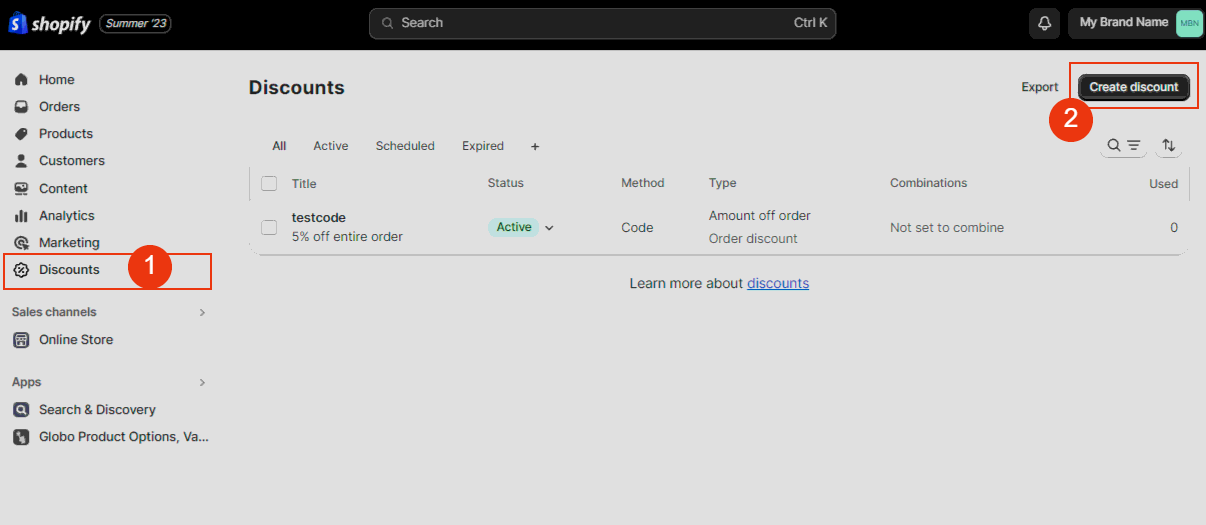
Once you’re in, click on the “Discounts” tab (1). Here, you’ll find the option to create a new discount. (2)
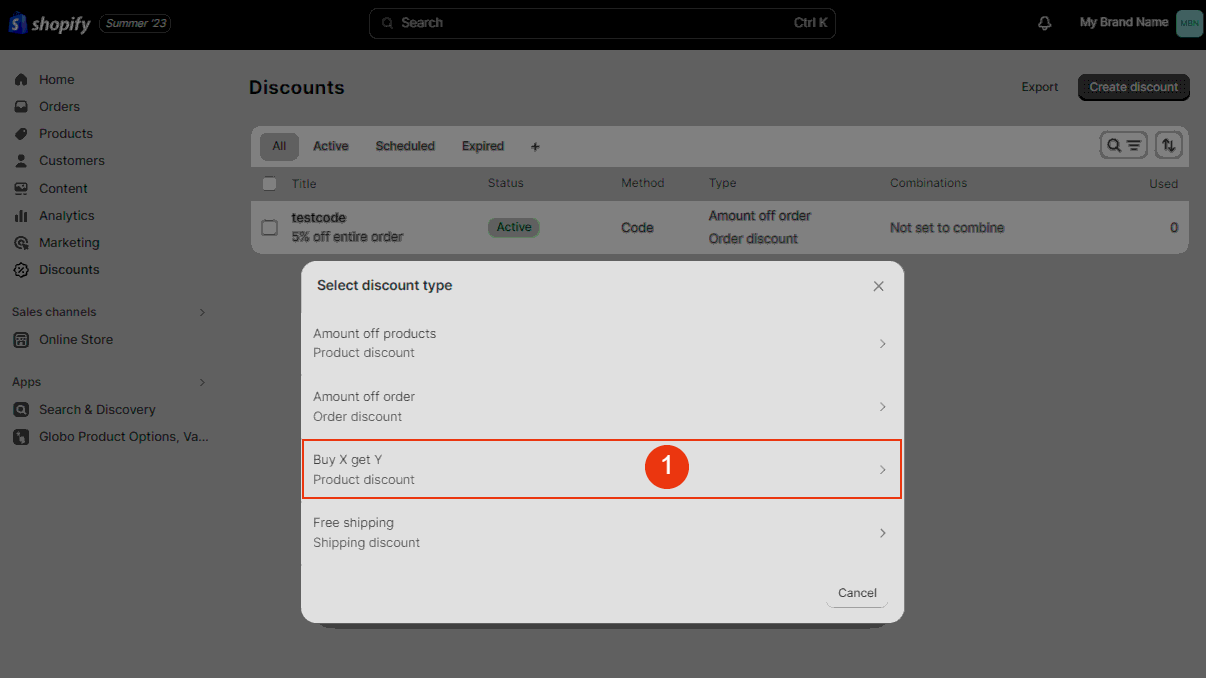
Next, choose the “Buy X, Get Y” option to proceed. (1)
Configure the Discount Settings
Naming Your Discount
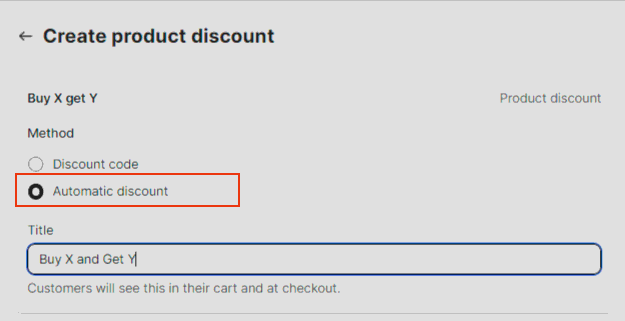
After selecting the “Buy X, Get Y” option, make sure to check the “Automatic Discount” box. This is crucial for the discount to be applied automatically at checkout. Next, give your discount a memorable name. This will help you identify it later in your admin panel.
Setting the Conditions
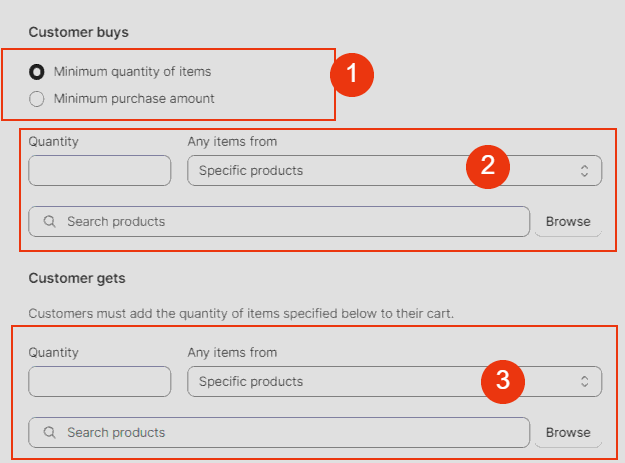
In the “Customer Buys” section, you’ll have two options to choose from:
- Minimum quantity of items (1)
- Minimum purchase amount
Select the one that aligns with your promotion strategy.
Choose Which Products or Collections the Discount Applies to
You have the flexibility to apply this discount to either specific products or entire collections. Use the search tool to add the items you want to include in this promotion. If you opt for products, you can even select specific variants.
Discount Type and Limitations
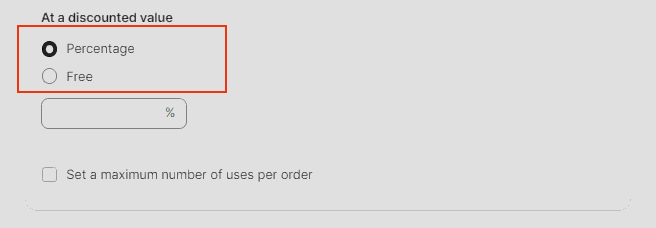
You can choose to either take a percentage off each eligible item or make the item free. If you want to limit the usage of this discount, there’s an option to set a maximum number of uses per order.
Set the Timeline – Start and Stop the Discount
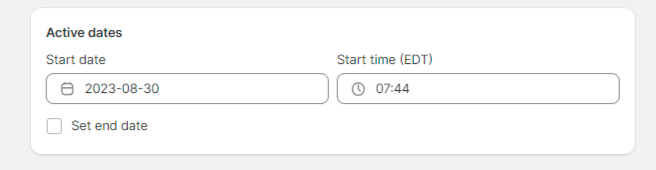
The last step is to set the start and end dates for your discount. Shopify allows only one automatic discount to be active at a time, so make sure your active dates do not overlap with any other discounts.
Automatic Discount Completed
Once you’ve configured all the settings, hit “Save.” Your new automatic discount will now appear under the “Active” tab in the “Discounts” section. Remember, Shopify labels any automated discount codes as “automatic” in the method column, so you can easily identify them later.
More Shopify Discount Examples You Should Consider
We’ve already discussed the nuts and bolts of setting up automatic discounts on Shopify. Now, let’s take it a step further by exploring some creative examples that can help you maximize sales and customer engagement.
Example 1: The “Buy More, Save More” Strategy
How It Works
Create an automatic discount that offers a percentage off based on the quantity of items purchased. For instance:
- Buy 2 items, get 10% off
- Buy 3 items, get 15% off
- Buy 4 or more items, get 20% off
Why It’s Effective
This strategy encourages customers to buy more products, increasing your average order value.
Example 2: The “Weekend Flash Sale”
How It Works
Set up an automatic discount that activates only during the weekend. Offer a flat 20% off on all items or specific collections.
Why It’s Effective
Limited-time offers create a sense of urgency, encouraging customers to make a purchase before the deal ends.
Example 3: The “First-Time Buyer” Incentive
How It Works
Offer a special 10% discount that automatically applies to the carts of first-time buyers.
Why It’s Effective
This can be a great way to convert hesitant first-time visitors into paying customers.
Example 4: The “Holiday Special – BOGOF”
How It Works
During holidays like Christmas or Black Friday, offer a “Buy One, Get One Free” (BOGOF) deal on select items.
Why It’s Effective
Holiday seasons are when people are most willing to spend. A BOGOF deal can be the final nudge they need to make a purchase.
Example 5: The “Loyalty Reward”
How It Works
Set up an automatic discount that applies only to customers who have made more than X number of purchases in the past.
Why It’s Effective
Rewarding loyal customers not only makes them feel valued but also encourages repeat business.
Example 6: The “Cart Value Threshold”
How It Works
Offer free shipping or a free gift when the customer’s cart value crosses a certain threshold, say $100.
Why It’s Effective
Customers love freebies and are likely to add more items to their cart to reach the threshold.
Final Thoughts
Automatic discounts are a versatile and powerful tool in your Shopify arsenal. They can be tailored to fit various marketing strategies, from boosting sales to building customer loyalty.
Some of the scenarios above are not available natively within shopify and you may need to use a discount app from the shopify app store. I suggest you start by experimenting with the shopify default discounts first to discover what’s available out of the box.
So go ahead, experiment with these examples and watch your sales soar!
Additional Resources
For Shopify Discount Apps visit the Shopify app Store
For more in-depth information, you can visit Shopify Help.


